Sunday, June 13, 2010

Timeline of Josie's condition for the new neurologist

We're taking Josie to see a new neurologist tomorrow.  Last year we realized that we need to keep track of her abilities so that we can share that information with new doctors, therapists, caseworkers, and anybody else who asks.  So here it is.  Looking back it is a bit depressing, but the good news is, her condition hasn't gotten much worse over the last year.

Josie's development up to about 1 year seemed fairly normal or at least unremarkable.  We could be a little off on the ages cited below but overall development seemed to be within the normal range her first year.

4 months or younger - amazing head control, would often lift head up from car seat as if sitting up.

5 months - rolling, scooting

6 months - sitting up

10 months - crawling on knees and hands.  Josie was a good crawler

12 months - we noticed that she wasn't developing her speech and motor skills as a typical one year old would.

12 to 14  months - began pulling up to standing position but not as much as our older daughter.  Don't have clear memory of when sleeping became a problem but it was around this time possibly before.  Josie would wake up many times during the night and did not sleep for long stretches. 

18 months -
·      Several  indicators that something was wrong.  Shad not yet begun to walk.  Her pediatrician ruled out metabolic problems and bone structure problems and referred me to a P.T., Debbie Patrizi.  The PT referred me to pediatric neurologist and a pediatric orthopedist. The Ped orthopedist, Dr. Lincoln, said that whatever was causing her not to walk had nothing to do with her bones. 

·      Summer 2006 - first visit to pediatric neurologist, Dr. Griffen.  Dr. Griffen ordered several blood tests; none of which provided a diagnosis or direction.

2years 2 months - Early 2007 - Josie finally begins to walk independently but with difficulty. 

2 years 3 months - Feb. 2007  Muscle and nerve conduction test in Fremont.  Results showed that Josie's muscles were fine.  Strongly suggested a nerve problem.

2 .5 years -
·      Around April or May 2007 - Josie had an MRI, everything looked fine.  Josie was walking at this appointment. Dr. Griffen moved to S.F. so we started working with Dr. Malhotra.

·      Josie was a W sitter. Josie would crawl and put herself in W position or change out of it on her own.

·      May 30, 2007  - Josie started Anat Baniel Method  (ABM)

·      Early June 2007 Josie abruptly stopped walking after 8 sessions of ABM. Josie was still mobile at this time with crawling and some climbing.

·      July or Aug 2007.  Josie started using a walker.  She was very good at using the walker to get around.

·      Aug. 27, 2007.  Josie fell over in the driveway in her walker.  She broke her elbow.  This was the beginning of a huge setback.

·      Sept 07.  While Josie was in full arm cast, we did more ABM with different practitioner.   The cast severely limited her ability to move although she did do some crawling with cast.  Very little if any walker use and from her fractured elbow on she never effectively used the walker again.

Almost 3 years to 3.5-
·      October 8, 2007  Josie had a biopsy of her muscles and nerves.  Biopsy showed axonal degeneration with some reinnervation.  Biopsy also showed that muscles were fine.

·      Continued gradual loss of abilities and mobility over the next several months.  Even unable to sit up for a while but we pretty much got that back through therapy efforts with Lynn at Concord CCS.   Somewhere during this time Josie got her first pair of AFOs.

·      Early 2008  Becoming very hard to transport (lift) Josie.  She weighed about 50 pounds. She was transported with a CCS loaner wheelchair at pre school.  At some point they lent us the wheelchair for bus transport.  In March 2008 we got a loaner wheelchair from National Seating and Mobility - at first it was a terrible fit but later adjusted and it and it worked fairly well for bus transport.

·      June 2008  we purchased a Quickie wheelchair.  She loves her wheelchair but she began slipping out of both the old and new wheelchair.  This continues to be a problem.

3.5 to 4 years -
·      August 2008  We moved to Oakland.  Josie's grandpa did intensive exercise regimen with Josie over the course of this year.

·      Somewhere in this time period Josie starting to lose the ability to crawl on hands and knees and overall strength. 

·      Nov. 2008  Josie was casted for new AFO's in an attempt to stop Josie from "slipping or slithering" our of her old ones. 

4 to 4.5 years
·      Dec.  2008  Finally started PT and OT with Oakland CCS one hour per week.  Josie had received NO services since summer.  By this time Josie's heel chords were very stiff and her plantar flexion was very limited.  Feet deformed looking.  No ability to stand.  Rolling over gone by now too.  Crawling on all fours doable thanks her grandpa but very very labored. 

·      Dec. 23, 2008 - through efforts of CCS PT got Josie in a loaner mobile stander.  It made an incredible difference.  A combination of AFOs and the stander greatly improved her plantar flexion in her heels.  In fact, the AFOs needed to be remade with a sharper angle.  We also borrowed weight bearing walkers, but Josie never learned to use them well. 

·      April 2009  Met with Malholtra.  Autoimmune disease possibility raised.  Malholtra said he hasn't helped us much.  Upon our request for other opinions, he suggested we go to St. Louis to meet with Dr. Connolly, a doctor he worked with previously.

4.5 to 5 years
·      Approx. May 2009.  Josie got her own mobile stander to replace the loaner, which was getting small.  Right around this same time she got a pressure sore.  Without the use of her AFOs, she lost her ability to plantar flex.

·      June 15, 2009  Josie became very constipated (didn't have BM for over a week).  From then on she has seemed a lot less regular despite our efforts (lots of water, fiber, supplements, etc) to get her back on track.  She currently has a bowel movement 4 to 5 times per week - the feces is very hard. 

·      June 20, 2009 I started giving her some SunRider foods.  Sometime soon after sleep improved.

·      Summary of Josie's abilities as of July 2009. 
Able to roll tummy to back, still needs a little assistance back to tummy.  Able to rock side to side on back and does it often.  Able to deliberately lift legs one to two inches while sitting in the potty chair. Able to wheel wheelchair and stander around house with skill and functionality.  Sings ABCs and others songs.  Repeats a lot of things she hears. Answers simple questions.  Tolerates the walker well for about an hour a day

Josie can army crawl with much effort.  It takes her a while to get anywhere and the farthest she crawls in one effort is about 3 feet.  Some days are markedly better than others.. She has the routine of army crawling to her shoes every morning.

Josie attends PT and OT at Oakland CCS on Tuesdays from 9 to 10. Josie has had intermittent great days at therapy where she army crawled over 15 feet or really got into rolling.  However, there have been low days too.  We seemed to have completely lost crawling on all fours since therapy started.

Josie can maintain the sitting up position with legs in front of her but bent a little (called ring-sitting) on the floor, although she hunches over and grabs her pant legs for support.  She has to be encouraged and does not prefer this position.

We started swimming lessons twice a week on June 15. 

·      August 2009.  We went to St. Louis Children's to meet with Dr. Connolly.  She gave Josie a sedated muscle and nerve conduction test.  Dr. Connoly's opinion is that Josie has a muscle problem, not a nerve problem.  Several possibilities came from this appt, but none have panned out.  Again, possibility of an auto immune problem was raised.  Neither Connolly or Malhotra could explain difference in results between biopsy and her conduction test. 

5 to 5.5 years (present)
·      Josie has maintained most of the abilities in above summary but no longer tolerates her walker for longer than 10 minutes.  She has lost most of her ability to use her legs in an upright position (and the walker no longer fits well.)

·      Sleep continues to go well; she responds well to our bedtime routine and sleeps through the night (about 8p.m. to 6a.m.) most nights.

·      January  2009 - Heel chord lengthening surgery.  Successful!

·      March 2009.  Josie got her casts off from surgery - shortly after that she got another pressure sore on her right heel which took 2 months to heal.

·      Seems to be growing cognitively, especially an improvement in speech.  In many ways her cog. Development is about the same as a 2 or 3 year old though her fine motor is significantly less

·      Socially, she is comparatively advanced.  She loves people.  She loves school, loves her teachers, and loves church.

·      Although she has been drinking out of a cup for over a year, she still "forgets how." Often coughing and spluttering, especially when not in her highchair.

·      She thrives on routine.

·      Has always had a very short attention span but will now pay attention when short books are read to her and retells some of the books on her own.

·      Continues to have good reflex responses in legs and feet.

That's it for Josie's first five and a half years.  Still no diagnosis.  We haven't made much progress on that front in the last year.  But she's stayed pretty steady in her abilities for the last year.  It has been a great respite from the times when her condition got progressively worse in awful bursts.

We don't expect much from tomorrow's meeting.  But we are hopeful that this will be the beginning of a fruitful relationship.

Sunday, June 6, 2010

Maker Faire - What a blast!

The Maker Faire was awesome again.  It is incredible to see all the amazing things that people come up with.  There is so much to see.  It is a bit overwhelming.  Most of the time, we flit from booth to booth, like gnats with ADD.

Next year I think I need to accept the fact that I won't see the whole thing, and spend more time at the individual booths.  One of the coolest things about the Maker Faire is that the guy who came up with the idea is right there, talking about his (or her) creations.  They did a great job, I should thank them for that.

So to all you awesome makers out there, Thanks!

Now here are some pics:


And a Video:


One of the coolest things was running into old friends there.  It is pretty awesome to see a familiar face in a crowd of 50,000.  I hope to see you there again, next year.

Wednesday, March 31, 2010

Response to automobile-centric design

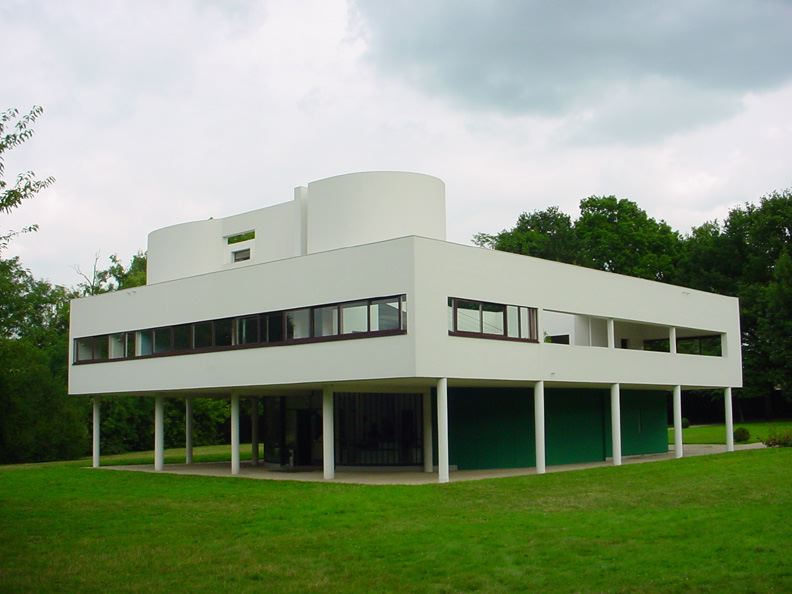
Corbusier's Villa Savoye is notable because it was designed exclusively for cars at a time when not everybody had one.

Things have changed since then.  Today nearly EVERYTHING is designed for cars. We don't even notice how much of an impact they have on how we live.  For instance, 1/4 of my home is devoted to the garage.  1/2 of the area of any retail establishment is required for parking.  A significant fraction of a city is devoted exclusively to cars.

As a design exercise, I'd like to consider how the built environment would change if we put an equal effort into design for bicycles.

Where to begin?  An internet search for bike storage.  Here are some of the best results I found:
 http://www.re-nest.com/re-nest/shelving-storage/a-green-search-the-best-indoor-bicycle-rack-026165
http://www.remodelista.com/posts/storage-inside-bicycle-storage-roundup
http://www.flickr.com/photos/fastboy/287650174/

http://www.flickr.com/photos/toomanybicycles/258520950/in/set-72157594433824691/

Honestly I'm a bit disappointed in these.  You can either hang your bike on the wall or hang it from the ceiling. 

I want something more.  I spend a significant amount of time and money on my bike.  I think it's a thing of beauty.  I'd like to store it in style.  Perhaps put it on display when I'm not riding it.  I think there's a lot of potential for innovation here.  What if the bike replaced the fireplace as the focal point of a living room?  A hook shaped wall hanger just doesn't cut it anymore.

Got any ideas for better designs?  Tell me about them.  I'll post my own ideas in future blogs.

Thursday, March 11, 2010

Yikes!

1/2 folding bike, 1/2 electric bike, 1/2 sized penny farthing, fully awesome.
http://www.yikebike.com

My folding bike (a Giant Halfway), weighs in at nearly 30 pounds.  This bike is 1/3 less weight, but 10 times the price.

Here's a round up of traditional folding bikes:
http://www.optimalride.com/folding-bicycles/best-folding-bikes.html

Monday, March 8, 2010

Managing CAD Standards with Excel

We started working with a single file.  Then we moved to applying a script to multiple files with information pulled in from the operating system.  Now we’ll discuss managing CAD standards information in Excel.

Any text information can be dropped into Excel, so an obvious place to pull info is the command line in AutoCAD itself.  Layer information, styles, and dimensions can be collected from AutoCAD, and placed in Excel, where they are easily viewed and adjusted.  Then, using the strategies shown earlier, that information can be returned to the CAD files, or applied to new files.

It is like working on a 1000 piece puzzle.  It is easiest to pull out a bunch of similar pieces (all the edges or all the bright orange pieces) and work on them separately.  Once you have that chunk put together you can return it to the main puzzle.

Layers from AutoCAD

Many commands allow you to list properties information:  (-LAYER) layers, (DIMSTYLE) dimension styles, (LIST) properties, and (STATUS) status just to name a few.  We’ll focus on the layers.  Open a file that has your standard layers in it, and list the layers.

Here’s the command sequence -layer ? *
The text window should open.


Notice how the information comes out in a mostly tabulated form: just like a spreadsheet.  You can copy the text from here and paste it into Excel.

At this point there are three main problems with the transferred information:

   1. The information is in one single column.
   2. The conversion from text to columns isn’t properly delimited.
   3. There is some information that may cause data type errors in excel.

These are all fairly easy to deal with, but issues “B” and “C” may not be apparent till you’ve already dealt with issue “A.”  An illustration may come in handy.  Here’s what you could end up with if you just dive in.

   1. Excel assumes that the dash should be considered as a minus sign and turns it into a function
   2. An extra space in front of “Layer” pushes it over by an extra column
   3. The word “(white)” is redundant.  The space before it pushes the column over to the right.
   4. The error message for #1
   5. Spaces within names of layers are read as indications of new columns

If you’ve come to this point, you could go through and clean up the information line by line and waste hours.  But, in this case, an ounce of prevention is worth a pound of cure.  You can do a little bit of work up front and save yourself a lot of heartache in the end.

First, be sure that none of your layer names contain spaces.

Second remove all the named colors.  Find and replace will make this happen very quickly.  As an example, you can trade (red) for blank.


Then do the same for, (white), (yellow), (cyan), (blue), (magenta) and (green).

 Third, convert your column of text into a table.  Select your column and choose “text to columns” from the data tab.

A wizard pops up that will take you through the steps.  Here are screen shots of my preferences.


Now that’s a fine looking table!  You can adjust it as you like.  You may want to remove the blank rows and the “Press enter to continue” rows.  You may want to add descriptions, colors, and titles.  It is now a document that you can print out and give to all your AutoCAD users.  You can make it as pretty as you like


But what happens if you’d like to add some additional layers?  Or change some of the information in your file?  It would be a shame to have to start with the CAD information, convert it and clean it every single time.  The better thing to do is to turn this file into a script that will create all your layers automatically.

Excel Layers to AutoCAD

We have all the layer information.  We simply need to figure out what inputs are required for the LAYER command, and then put our information into the proper locations.  The script should look something like this:

LAYER

MAKE #1name COLOR #1color #1name LTYPE #1ltype #1name

MAKE #2name COLOR #2color #2name LTYPE #2ltype #2name

MAKE #3name COLOR #3color #3name LTYPE #3ltype #3name


SET

0

Where #name, #color, #ltype, and #p come from the columns we created earlier.

We want to keep our Layer Standards list as nice as possible for the CAD users, so the script should be generated on a different sheet.  We’ll have to reference across sheets, but that isn’t too difficult.


Once you have a full row, concatenate your script, add spaces, then autofill.


Copy that column and paste it into a script.  You’ll need to open with the LAYER command and close with a couple extra returns to conclude the LAYER command.  And that’s it.  I’ve placed a copy of the spreadsheet and the resulting script on Google docs here:
spreadsheet https://docs.google.com/templates?q=GeneralLayers_01&sort=hottest&view=author

And here:
script https://docs.google.com/templates?q=Layer_script&sort=hottest&view=public

Epilogue:

Through this series of blog posts, I’ve shown how Excel can be a powerful tool for developing AutoCAD scripts.  There are of course other ways of accomplishing the same tasks.  There are commercial tools specifically created to write scripts.  AutoDesk has even created an “Action Recorder” to automate script creation.  If you wanted something faster more powerful, you could use AutoLISP or VBA programming languages to accomplish the same things.

The beauty of this method is that it relies on software that is ubiquitous and very little additional specialized knowledge.  These methods can be applied to other automation problems.  It is a more general solution.

Best of all, this is a stepping stone to getting into some more advanced code writing.  The first step into the world of programming is understanding that computers execute a series of instructions in order.  Writing any program is simply creating a template for a series of actions.

Someday I may take it to the next step with AutoIT3, but for now I plan to get back to biking stuff.

Friday, February 19, 2010

I built my first bike!

In glorious 3D
Check it out!


Here's the link.
I've been wanting a decent road bike for a SketchUp project, and I couldn't find a match in the 3D Warehouse.

Friday, January 29, 2010

Playing a Concert on a Kazoo: Collecting Files in DOS

Wouldn’t it be nice to apply a script of any complexity to a whole lot of files all at once?  It’s possible if you’ve got a list of addresses for each of those files.  How do you get a list of addresses?  I use the DIR command in DOS.

You're going to need a bit of background in DOS if you don't have it already**.  Here it goes...

If you are familiar with AutoCAD then you are familiar with the Command line.  It is that constant flow of text across the bottom of the AutoCAD window.  That piece of the interface is EXTREMELY old.  All computer programs through the 60s, 70s and into the 80s ran from a command line.  In fact Windows is called “Windows” because it broke away from the command line into a window based interface.  Before then the Microsoft operating system was called DOS and was entirely text based (at least that’s what users worked with).

There are still vestiges of the old system hanging around.  If you click on the start button and select Run… and type cmd you’ll get a command line window that allows you to access the operating system.  You can navigate up and down through folders as you do in the Graphical User Interface (GUI).   You can copy files, and do all the other things you’d do through the GUI, it just looks different.


There are things you can do with DOS, that you can’t do in Windows (at least not without a special utility).  In particular, you can create a list of files from a directory.  There’s a lot of other stuff you can do, but that gets deeper into DO than I’d like, so I’m going to leave that between you and the help files (HINT: Start Button: Help and Support).  I’ll just give you an example of what I use to collect the addresses I need:

dir "C:\Documents and Settings\mritzman\My Documents\ACAD_Excel\*.dwg" /s /b > drawing_list.txt

This command line instruction will scan through the given location and collect all the DWG file names (and paths) into a text file named drawing_list.txt.  The text file output is placed in the current folder as indicated by the command line.


Now that we’ve got the list of files, we need to open them, run a series of commands, save and close the files.  The basic template is this:

OPEN “C:\...Path…\dwg_name(1).dwg” COMMANDS QSAVE CLOSE
OPEN “C:\...Path…\dwg_name(2).dwg” COMMANDS QSAVE CLOSE
And so forth. 

Note that we need quotation marks around the file path and name.  (This is because we may have spaces that would normally cause AutoCAD to start a new command). 

Create this as a template in Excel.


  • For our purposes, we’ll reuse the function we started with:  add a square to the origin of each of each file.
  • Fill in the columns from our sources.  
  • Add in the concatenate command.  
  • Make sure quotations and spaces are in the right places.   
    • Add a space and quotes at the end of the OPEN command 
    • Add quotes and a space at the beginning of the command series (REC and so forth)
    • Add a space after the QSAVE command
  • Add an =CONCATENATE() series to tie everything together.
It should look something like this:


AutoFILL throughout the rest of the spreadsheet.

Copy this to Notepad and run it as a script in AutoCAD.

Once again, here’s a spreadsheet as a Google Doc.  Unfortunately, the paths and names are unique to my computer, so you'll have to go to some extra effort to get all the pieces to come together properly.

In this section, we’ve covered two main points:
1.    How to collect file information from the DOS prompt.
2.    How to deal with spaces in file paths and names. (Use quotes.)

In the next post well pull information from AutoCAD.  We’ll run into more situations where syntax between Excel and AutoCAD doesn’t translate directly.  And we'll figure out how to correct those problems.

** I used to take the command line for granted.  Then I found this essay by Neil Stephenson: In the Beginning was the Command Line It is beautifully written and well worth the effort to download.